
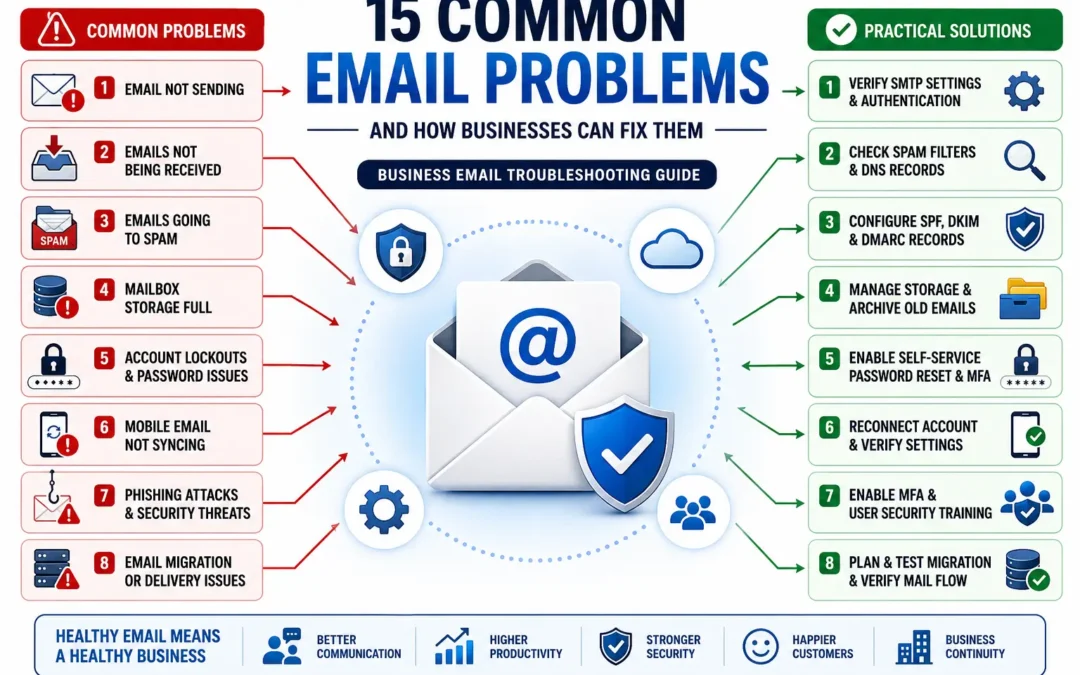
Email is one of the most important business tools in the modern workplace. It powers communication with customers, vendors, employees, and partners. Yet despite its importance, email problems remain one of the most common sources of frustration for organizations of all sizes.
A missed customer inquiry, delayed invoice, or inaccessible mailbox can quickly turn into lost revenue, damaged relationships, and operational disruptions.
The good news is that most email issues have identifiable causes and proven solutions.
In this guide, we’ll explore the most common email problems businesses encounter, explain why they happen, and provide practical steps to resolve them.
Why Email Problems Matter More Than Most Businesses Realize
Many organizations view email issues as minor technical inconveniences. In reality, email serves as the communication backbone for most businesses.
When email stops working properly, organizations may experience:
- Missed sales opportunities
- Delayed customer responses
- Reduced employee productivity
- Security risks
- Compliance concerns
- Reputational damage
A single email issue can affect dozens or even hundreds of users, making prompt diagnosis and resolution essential.
1. Emails Not Sending
One of the most common complaints businesses encounter is the inability to send email messages.
Users may receive error messages, messages may remain stuck in an outbox, or emails may appear to send successfully but never reach recipients.
Common Causes
- Incorrect SMTP settings
- Authentication failures
- Expired passwords
- Internet connectivity issues
- Mail server outages
- Email provider restrictions
How to Fix It
Start by verifying:
- Internet connectivity
- Email account credentials
- SMTP server settings
- Outgoing mail ports
- Multi-Factor Authentication requirements
If multiple users are affected, the issue may originate with the email provider rather than individual devices.
2. Emails Not Being Received
A business can lose valuable opportunities when incoming messages fail to arrive.
This issue often creates confusion because senders assume messages have been delivered successfully. Organizations using Microsoft 365 can often determine exactly what happened to a missing message by using Exchange Message Trace. Microsoft’s guide to Message Trace in Exchange Online explains how administrators can track email delivery and identify routing or filtering issues.
Common Causes
- Spam filtering
- Mailbox storage limits
- DNS configuration errors
- Blocked sender domains
- Email routing issues
How to Fix It
Check:
- Spam and junk folders
- Mailbox quotas
- Domain DNS records
- Message trace logs
- Email security settings
For businesses using Google Workspace, Google’s official Email Troubleshooting Guide for Administrators provides step-by-step instructions for diagnosing delivery problems, MX record issues, routing errors, and missing messages.
3. Emails Going to Spam
Few email issues are more frustrating than legitimate business messages being treated as spam.
This problem can significantly impact sales, marketing, customer support, and vendor communication.
Common Causes
- Missing SPF records
- Missing DKIM authentication
- Missing DMARC policies
- Poor domain reputation
- Blacklisted IP addresses
- Excessive marketing content
How to Fix It
Implement:
- SPF records
- DKIM signing
- DMARC policies
- Domain reputation monitoring
- Email authentication best practices
Businesses that regularly send newsletters should pay particular attention to email authentication and list hygiene. If you’re unsure whether your domain has email authentication issues or reputation problems, run a free domain health scan using the MXToolbox Email Health Check. The tool can identify common problems involving SPF, DKIM, DNS configuration, blacklist status, and mail server health.
4. Mailbox Storage Limits Reached
As mailboxes grow, users may eventually exceed storage limits.
When this happens, sending and receiving email may stop entirely.
Common Causes
- Large attachments
- Archived projects
- Duplicate messages
- Long retention periods
How to Fix It
Businesses can:
- Increase mailbox storage
- Implement archiving solutions
- Delete unnecessary messages
- Move attachments to cloud storage platforms
Preventive mailbox management often eliminates future storage-related disruptions.
5. Forgotten Passwords and Account Lockouts
Password-related issues remain one of the most common support requests for organizations.
Account lockouts can bring productivity to a standstill. Businesses can reduce support requests by enabling self-service password resets. Microsoft’s Self-Service Password Reset Documentation explains how organizations can allow users to securely reset their own passwords without requiring IT intervention.
Common Causes
- Incorrect passwords
- Expired credentials
- Failed MFA attempts
- Saved passwords on multiple devices
How to Fix It
Consider:
- Password managers
- Self-service password reset tools
- Employee security training
- Multi-Factor Authentication enrollment procedures
Modern identity management solutions significantly reduce password-related support requests.
6. Mobile Email Not Syncing
Business users increasingly rely on smartphones and tablets for email access.
Synchronization failures can create confusion and missed communications.
Common Causes
- Device configuration issues
- Expired credentials
- MFA enrollment changes
- Connectivity problems
How to Fix It
Verify:
- Device connectivity
- Account settings
- Authentication methods
- Mobile device policies
In many cases, removing and re-adding the account resolves synchronization problems.
7. Shared Mailboxes Not Working Properly
Shared mailboxes are commonly used for support, sales, accounting, and administrative functions.
When access issues occur, entire teams can be affected.
Common Causes
- Permission changes
- Licensing issues
- Synchronization delays
- Mailbox corruption
How to Fix It
Review:
- User permissions
- Group memberships
- Delegation settings
- Shared mailbox configuration
Regular audits help prevent permission-related disruptions.
8. Email Security Threats and Phishing Attacks
Email remains the primary entry point for many cyberattacks.
Modern phishing campaigns are significantly more sophisticated than they were even a few years ago.
Common Threats
- Credential theft
- Business Email Compromise (BEC)
- Malware attachments
- Fake invoices
- Executive impersonation
How to Fix It
Businesses should implement:
- Multi-Factor Authentication
- Security awareness training
- Advanced spam filtering
- Conditional access policies
- Email security monitoring
Cybersecurity should be viewed as an ongoing process rather than a one-time project.
9. Duplicate Emails Appearing in Mailboxes
Duplicate messages create clutter and can cause users to miss important communications.
Common Causes
- Misconfigured mail clients
- POP3 synchronization issues
- Third-party integrations
- Mobile device conflicts
How to Fix It
Review:
- Mail client settings
- Synchronization methods
- Third-party applications
- Account configuration
Moving away from legacy POP3 systems often eliminates recurring duplication issues.
10. Calendar and Contact Synchronization Problems
Email systems are no longer just about messages.
Calendars and contacts play a critical role in daily business operations.
Common Causes
- Device synchronization conflicts
- Migration errors
- Incorrect account configuration
- Third-party software issues
How to Fix It
Verify synchronization settings and ensure all devices connect to the same email platform.
Consistency across devices is often the key to avoiding recurring issues.
11. Email Migration Problems
Organizations frequently encounter challenges when moving email systems from one platform to another.
Whether migrating to Microsoft 365, Google Workspace, or another provider, email migration introduces additional complexity.
Common Migration Issues
- Missing messages
- Incomplete mailbox transfers
- Calendar migration failures
- Shared mailbox issues
- DNS cutover mistakes
- User authentication problems
How to Fix It
Successful migrations require:
- Proper planning
- Pre-migration assessments
- Pilot testing
- Validation procedures
- Post-migration support
Businesses often underestimate the complexity involved in moving mailboxes, calendars, contacts, shared mailboxes, security settings, and DNS configurations between platforms. A successful migration requires careful planning, testing, user communication, and post-migration validation. If you’re preparing for a migration project, our Ultimate Guide to Email Migration Services covers migration methods, project planning, risk mitigation, timelines, and what businesses should expect before, during, and after a migration.
12. Email Delivery Problems After Switching Providers
Many businesses assume that once mailbox data has been migrated, the project is complete.
In reality, email delivery problems often emerge after switching providers.
Common Causes
- Incorrect MX records
- Incomplete DNS updates
- Misconfigured SPF records
- Missing DKIM authentication
How to Fix It
After a migration:
- Verify MX records
- Test inbound email
- Test outbound email
- Validate SPF, DKIM, and DMARC settings
- Monitor mail flow closely
Many post-migration issues can be prevented through comprehensive testing before final cutover. DNS updates, mail flow validation, SPF records, DKIM configuration, and user testing are among the most critical steps in any email migration. Organizations that skip these validation processes often experience delivery problems after switching providers. Our Ultimate Guide to Email Migration Services includes a detailed breakdown of pre-migration planning, DNS changes, testing procedures, and post-migration support considerations.
13. Large Attachments Failing to Send
Email platforms impose size limits on attachments.
Users often discover these limits only after messages fail.
Common Causes
- File size restrictions
- Provider limitations
- Security policies
How to Fix It
Instead of emailing large files:
- Use OneDrive
- Use SharePoint
- Use Google Drive
- Share secure download links
Cloud storage solutions provide a more scalable approach to file sharing.
14. Email Account Compromises
Compromised email accounts can expose sensitive information and create serious operational risks.
Warning Signs
- Unexpected password changes
- Unauthorized forwarding rules
- Unusual login activity
- Outbound spam messages
How to Fix It
Immediately:
- Reset passwords
- Revoke active sessions
- Enable MFA
- Review mailbox rules
- Conduct a security review
Early detection significantly reduces potential damage.
15. Aging Email Systems Becoming Unreliable
Many organizations continue operating on legacy email systems long after they should be upgraded.
Older platforms often become increasingly difficult to maintain and secure.
Warning Signs
- Frequent outages
- Limited storage
- Compatibility issues
- Security concerns
- Growing maintenance costs
Many organizations reach a point where troubleshooting recurring email problems becomes more expensive than upgrading the underlying platform. If you’re evaluating whether it’s time to move from an aging email system to Microsoft 365, Google Workspace, or another modern platform, our Ultimate Guide to Email Migration Services explains the migration process, common migration types, costs, timelines, and best practices for a successful transition.
How to Fix It
Evaluate modern cloud-based platforms such as Microsoft 365 or Google Workspace.
A planned migration often improves reliability, security, scalability, and long-term costs.
How to Prevent Most Email Problems
Many organizations spend significant time reacting to email issues that could have been prevented.
Proactive email management typically includes:
- Multi-Factor Authentication
- Email security monitoring
- User training
- DNS record maintenance
- Regular audits
- Backup and recovery planning
- Software updates
- Email archiving strategies
Businesses that invest in prevention generally experience fewer disruptions and lower support costs.
Frequently Asked Questions (FAQ)
Why am I not receiving emails even though my email account appears to be working?
Several issues can prevent emails from reaching your inbox, including spam filtering, mailbox storage limits, DNS configuration problems, blocked senders, or email security policies. If the problem affects multiple users, the issue may be related to your email provider or domain configuration rather than your individual mailbox.
Why are my business emails going to spam?
Business emails often end up in spam folders when email authentication records such as SPF, DKIM, or DMARC are missing or misconfigured. Poor domain reputation, excessive marketing language, and sending large volumes of email can also impact deliverability.
How do I know if my email account has been hacked?
Common warning signs include password changes you did not make, unexpected email forwarding rules, login alerts from unfamiliar locations, outbound emails you did not send, or complaints from contacts receiving suspicious messages from your account.
What is the most common cause of email delivery failures?
Incorrect DNS records, authentication issues, spam filtering, mailbox storage limits, and server outages are among the most common causes of email delivery problems. Proper monitoring and maintenance can prevent many of these issues.
Why is my business email not syncing on my phone?
Mobile email synchronization problems are often caused by expired passwords, authentication changes, connectivity issues, outdated mail applications, or security policy changes. Reconnecting the account frequently resolves the issue.
Can a full mailbox prevent me from receiving emails?
Yes. When mailbox storage limits are reached, many email platforms stop accepting new messages until storage is increased or messages are removed. Regular archiving and mailbox management help prevent this problem.
What should I do before switching email providers?
Before changing email providers, organizations should inventory mailboxes, review security settings, verify DNS ownership, create backups, identify migration requirements, and test the migration process. Proper planning significantly reduces downtime and data loss risks.
What are the most common email migration problems?
Common migration issues include missing emails, calendar synchronization failures, shared mailbox problems, DNS configuration mistakes, authentication issues, and post-migration mail flow disruptions. Most can be avoided through careful planning, testing, and validation.
How long does an email migration typically take?
The timeline depends on the number of users, mailbox sizes, migration method, and complexity of the environment. Small business migrations may be completed in a few days, while larger organizations often require several weeks of planning, testing, and phased migration activities.
Should small businesses use professional email migration services?
For many small businesses, professional migration services help minimize downtime, prevent data loss, ensure proper security configuration, and reduce the risk of business disruption during the transition to a new email platform.
Helpful Email Troubleshooting Resources
If you’re experiencing recurring email problems, these resources can help identify common issues:
- MXToolbox Email Health Check — Check DNS records, blacklist status, mail server health, and email authentication settings.
- Microsoft Exchange Message Trace Guide — Track email delivery and troubleshoot missing messages.
- Google Workspace Email Troubleshooting Guide — Diagnose delivery issues and email routing problems.
- Microsoft Password Security Best Practices — Improve account security and password management.
- Ultimate Guide to Email Migration Services — Learn how to plan, execute, and validate a successful email migration.
Final Thoughts
Email remains one of the most critical business technologies, but it is also one of the most overlooked.
Problems such as delivery failures, spam filtering issues, storage limitations, security threats, and migration challenges can all impact productivity and customer communication.
The most successful organizations treat email as a strategic business system rather than simply another software application.
Whether you’re troubleshooting ongoing email issues, improving security, or preparing for a platform migration, understanding the underlying causes is the first step toward maintaining a reliable and secure communication environment.
EMNM Email Migration and Email Management Services
If you’re planning an email migration project or looking to improve the management of your business email environment, EMNM offers a range of specialized services designed to support organizations of all sizes.
- Email Migration Services – Professional email migrations for Microsoft 365, Google Workspace, Exchange, IMAP environments, tenant-to-tenant projects, and more.
- Email Support Services – Expert assistance for email troubleshooting, delivery issues, account management, security configuration, and ongoing support.
- Managed User Onboarding and Offboarding – Streamline employee onboarding and offboarding processes while ensuring proper account setup, access management, and security controls.
Need help determining the right solution for your organization? Contact our team to discuss your requirements and receive expert guidance tailored to your business.
Recent Comments